The Complete Guide to Wireless CCTV Camera Challenges.
The Illusion of Effortless Security.
Wireless CCTV cameras promise a sleek, cable-free security solution. Their popularity is undeniable, offering DIY installation and remote viewing from your smartphone. However, the transition from wired to wireless introduces a complex layer of technical and practical hurdles that are often glossed over in marketing. This guide delves into every significant challenge, ensuring you make an informed decision for your property’s protection.
1. Core Technical Failures & Storage Pitfalls.
The technical foundation of standalone wireless cameras is where several critical vulnerabilities lie.
The Silent Failure of Local Storage.
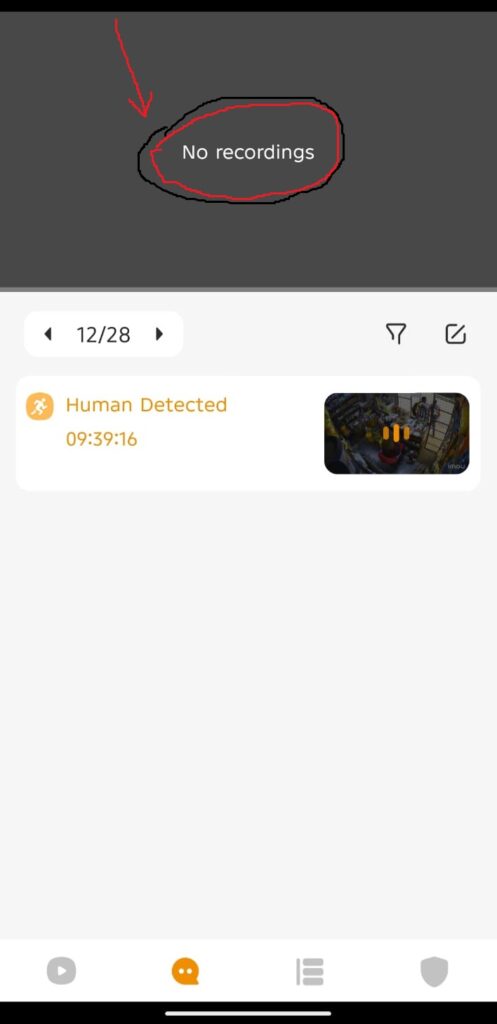
- SD Card Corruption: As mentioned, microSD cards are the Achilles’ heel. They endure constant read/write cycles, suffer from extreme temperature fluctuations, and can fail without warning. A corrupted card means total data loss.
- Limited Storage Capacity: Even a healthy 128GB card fills quickly with high-definition video, forcing overwrites of old footage, sometimes automatically deleting critical evidence.
- Physical Tampering: If the camera is stolen or accessed, the thief takes the evidence with them, rendering your security system useless for that incident.
Network Dependency and Performance.
- Bandwidth Hogging: High-resolution video streaming, especially from multiple cameras, consumes significant upload bandwidth. This can throttle other essential internet activities like video calls or streaming services.
- Latency and Live Feed Lag: The data journey from camera to router to cloud to your phone introduces delay. This “latency” can be several seconds, meaning you’re not watching live events, but recent history.
- Signal Range and Dead Zones: Thick walls, metal obstructions, and long distances severely degrade Wi-Fi signals. The further the camera is from the router, the more unstable the connection becomes.
2. Power Issues: The “Wire-Free” Myth.
The term “wireless” is frequently misunderstood, leading to placement and maintenance headaches.
The Battery Life Conundrum.
- Unpredictable Drain: Battery life estimates are based on optimal conditions. In reality, factors like frequent motion alerts, extreme cold, and constant live streaming can deplete batteries in weeks, not months.
- High Maintenance: Managing recharge cycles for multiple cameras is a logistical task. Forgetting to recharge one results in a dead camera and a security blind spot.
- Limited Feature Use: To conserve power, cameras often disable key features like continuous recording or high-quality live streams, reducing their effectiveness.
The Power Cable Compromise.
Many so-called “wireless” cameras still require a constant power source via a cable. This often defeats the purpose of flexible placement, as you remain tethered to an outlet and must manage wire concealment.
3. Security & Privacy Vulnerabilities.
Connecting a security device to your network can ironically create new security risks.
Cyber Attack Vectors.
- Weak Encryption: Some budget devices use outdated or weak encryption protocols, making the video feed susceptible to interception.
- Default Credentials: Users who fail to change default usernames and passwords leave their cameras openly accessible to online bot scans.
- Firmware Vulnerabilities: Manufacturers may not provide regular security patches, leaving known exploits open for hackers to access your home network through the camera.
Privacy and Data Ownership Concerns.
- Cloud Data Access: When using cloud storage, your footage resides on a third-party server. Understanding the provider’s data privacy policy, who can access it, and where it’s stored is crucial.
- Unauthorized Live Viewing: A compromised camera turns a tool for monitoring others into a tool for being monitored, leading to severe privacy invasions.
4. Functional & Environmental Drawbacks.
Day-to-day operation presents its own set of frustrations and limitations.
Intelligent Alerts and Nuisances.
- False Alarm Fatigue: Basic motion detection is triggered by shadows, moving foliage, insects, or pets. This barrage of irrelevant notifications leads users to ignore alerts entirely—a dangerous phenomenon known as “alert fatigue.”
- Limited Analytics: Without advanced onboard analytics, cameras cannot reliably distinguish between a person, a vehicle, and a swaying tree, reducing their smart functionality.
Physical and Environmental Limitations.
- Wireless Interference: Signals from neighboring Wi-Fi networks, Bluetooth devices, microwaves, and even baby monitors can cause interference, disrupting the camera’s connection.
- Weatherproofing Claims: Not all “outdoor” cameras are created equal. Inadequate sealing can lead to water damage, foggy lenses, or failure during extreme weather conditions like heatwaves or freezing temperatures.
- Limited Integration: Standalone cameras often operate in a closed ecosystem, making integration with a full-fledged security system, smart home platforms, or voice assistants difficult or impossible.
5. Long-Term Usability & Cost Challenges.
The initial purchase price is just one part of the financial and operational picture.
The True Cost of Ownership.
- Subscription Lock-In: Advanced features like intelligent alerts, extended video history, and user sharing are often locked behind monthly subscription plans, adding a recurring cost.
- Hardware Replacement: Batteries degrade over time. Outdoor cameras face wear and tear. The long-term cost of replacing cameras or components can be significant.
Management and Usability.
- App Fragmentation: Using cameras from different brands typically means juggling multiple, often clunky, smartphone apps—a frustrating and inefficient management experience.
- Legal and Ethical Compliance: In some regions, recording audio or pointing a camera at public spaces or a neighbor’s property has strict legal implications that users must navigate.
A Balanced Approach to Wireless Security.
Wireless CCTV cameras are powerful tools for convenience and supplemental monitoring. However, they are not a panacea. For mission-critical security, a professionally installed wired system with a Network Video Recorder (NVR) offers superior reliability, continuous recording, and no bandwidth issues.
Mitigation Checklist:
- Storage: Use High Endurance SD cards, check them quarterly, and opt for cloud backup if evidence is vital.
- Network: Invest in a mesh Wi-Fi system for full coverage, and prioritize camera traffic on your router.
- Security: Always change default passwords, enable two-factor authentication, and buy from reputable manufacturers that issue firmware updates.
- Power: For critical locations, use a wired power connection. For battery models, set a strict recharge schedule.
Common FAQs About Wireless CCTV Cameras.
What Are Wireless CCTV Cameras?
Wireless CCTV cameras are security cameras that connect to a network using Wi-Fi instead of network cables. They allow remote viewing using a mobile phone or computer.
How Do Wi-Fi CCTV Cameras Work?
Wi-Fi CCTV cameras connect to your router and send live video to a mobile app or cloud platform for monitoring.
Can Wireless CCTV Cameras Work Without Internet?
Yes. Many wireless cameras record locally on a microSD card, but internet is required for remote viewing.
Why Does My Wireless CCTV Camera Keep Disconnecting?
This is usually caused by weak Wi-Fi signals, router distance, network interference, or incompatible Wi-Fi frequency settings.
Why Can’t I View My CCTV Camera on My Phone?
This can happen due to incorrect app setup, internet issues, firewall restrictions, or the camera not being linked to the correct account.
What Is a Standalone CCTV Camera?
A standalone CCTV camera records footage internally using a memory card and does not require a DVR or NVR.
Are Wireless CCTV Cameras Reliable in Kenya?
Yes. They are reliable in areas with stable internet, but backup power is recommended due to power outages.
How Many Wireless CCTV Cameras Do I Need for My Home?
Most homes need between three and eight cameras depending on the size of the compound and number of entry points.
Why Is My Wi-Fi CCTV Video Quality Poor?
Poor video quality is often caused by low internet speed, weak Wi-Fi signal, or camera resolution limitations.
How Can I Improve Wi-Fi Signal for CCTV Cameras?
Place the router closer to the cameras, reduce obstacles, or use Wi-Fi extenders or mesh systems.
Do Wi-Fi CCTV Cameras Work at Night?
Yes. Most Wi-Fi CCTV cameras have infrared or color night vision for low-light conditions.
Do Wireless CCTV Cameras Use a Lot of Internet Data?
Yes. High-resolution streaming and cloud recording can consume significant data, especially with multiple cameras.
Can Wireless CCTV Cameras Be Hacked?
Yes. Cameras can be hacked if default passwords are not changed or firmware is outdated.
Why Does My Camera Disconnect When Many Devices Are Online?
Heavy internet usage from other devices can overload the network and affect camera performance.
Do Wireless CCTV Cameras Record When Internet Is Off?
Yes. Cameras with SD cards continue recording locally even when internet is unavailable.
Can I Install Wi-Fi CCTV Cameras Myself?
Yes. Most Wi-Fi cameras are plug-and-play and come with mobile app setup instructions.
Why Is My Nanny Camera Not Showing Live View?
This may be caused by weak Wi-Fi, incorrect app login details, or the camera being offline.
Which Is Better for CCTV Cameras, 2.4GHz or 5GHz Wi-Fi?
2.4GHz is better for CCTV because it has longer range and penetrates walls better.
Why Does My CCTV Camera Lag or Freeze?
Lagging occurs due to poor internet speed, weak Wi-Fi signal, or network congestion.
Can Wi-Fi CCTV Cameras Be Used Outdoors?
Yes. Outdoor Wi-Fi cameras are weatherproof and designed to handle rain and dust.
What Is Motion Detection in CCTV Cameras?
Motion detection allows the camera to start recording automatically when movement is detected.
Why Won’t My Nanny Camera Connect to My Phone?
This usually happens due to wrong app installation, network permission issues, or account setup problems.
Can I View Multiple CCTV Cameras on One App?
Yes. Most CCTV apps support viewing multiple cameras from one account.
Why Is Night Vision Footage Blurry?
Blurry night footage is often caused by dirty lenses, reflections from walls or glass, or incorrect camera angles.
What Happens to Wireless CCTV During a Power Outage?
Wireless CCTV cameras stop working unless they have battery backup or are connected to a UPS.
Can Wireless CCTV Cameras Work Far from the Router?
Distance and obstacles reduce Wi-Fi signal strength, so cameras may disconnect if too far from the router.
Do Wireless CCTV Cameras Need a DVR or NVR?
No. Most wireless and standalone cameras record internally or to the cloud.
Why Does My Wireless CCTV Battery Drain Fast?
High motion alerts, frequent recording, and high video quality increase battery consumption.
Can Wireless CCTV Cameras Deter Crime?
Yes. Visible CCTV cameras act as a deterrent and provide evidence if a crime occurs.
Which CCTV Cameras Are Best Where There Is No Wi-Fi?
4G or SIM-based CCTV cameras are best for locations without Wi-Fi or fixed internet.
Why Is One CCTV Camera Working and Others Are Offline?
This may be caused by router IP conflicts, power issues, or individual camera faults.
How Much Do Wi-Fi CCTV Cameras Cost in Kenya?
Prices typically range from KES 4,000 for basic models to over KES 25,000 for advanced cameras.
Can Wi-Fi CCTV Cameras Record and Stream at the Same Time?
Yes. However, this requires good internet speed and sufficient bandwidth.
Why Does My CCTV Camera Move or Restart on Its Own?
Some cameras have auto-tracking or self-calibration features enabled in the settings.
Are Nanny Cameras Legal in Kenya?
Yes, but it is advisable to inform caregivers to respect privacy and avoid legal issues.
Common Wireless CCTV Camera Issues & Fixes.
Common issues customers face with wireless CCTV cameras along with practical fixes.
1. My camera’s SD card says it’s full, or the video is corrupted. How can I get my footage back and stop this from happening?
- Fix: First, try reading the card on a computer with recovery software. To prevent it: Only use “High Endurance” or “Industrial” microSD cards designed for continuous writing. Format the card in the camera every 3-6 months, not on your computer. For critical evidence, use a camera that supports simultaneous cloud and SD card backup.
2. The live feed is always lagging or takes forever to load on my phone. Why isn’t it instant?
- Fix: This is usually a bandwidth issue. Lower the streaming quality in the camera’s app settings for faster loading. Ensure your camera’s Wi-Fi signal is strong (check the signal icon in the app). Upgrade your home internet upload speed, as it’s crucial for sending video out to the cloud and to your phone.
3. I get constant false alerts for shadows, headlights, and bugs. It’s driving me crazy!
- Fix: Access the motion detection settings. Draw custom activity zones to ignore areas like busy streets. Adjust the sensitivity slider down. If available, enable “Human/Vehicle Detection” instead of basic motion sensing. Also, check for cobwebs or insects on the camera lens housing.
4. My camera keeps disconnecting from the Wi-Fi. I have to keep resetting it.
- Fix: This is often due to a weak signal. Move your router closer or install a Wi-Fi extender/mesh system. In the router settings, ensure the 2.4GHz band is enabled (most cameras don’t use 5GHz). Set a static IP address for the camera in your router to prevent address conflicts.
5. The battery dies way faster than advertised. I’m charging it every week!
- Fix: High activity and extreme temperatures kill batteries. Reduce motion sensitivity and shorten the recording length per trigger. If in a cold climate, use a weatherproof battery model or a solar panel accessory. For high-traffic areas, consider a wired power option instead.
6. I can’t hear or talk through the two-way audio. The sound is choppy or non-existent.
- Fix: Audio requires strong, stable Wi-Fi. Check your upload speed. Ensure the microphone and speaker aren’t physically blocked. Disable noise cancellation in the app settings if available, as it can sometimes distort voices. Restart both the camera and your router.
7. I can’t get the night vision to work properly. The image is too dark or all washed out.
- Fix: Clean the infrared (IR) lens covers with a soft cloth. Ensure there are no bright light sources (like a porch light) directly in the frame, as this can blind the sensor. In the app, try switching between different night vision modes (e.g., auto, color, IR). Adjust the camera’s angle slightly.
8. The app says my camera is ‘offline,’ but my Wi-Fi is working perfectly.
- Fix: Power cycle the camera by unplugging it or removing the battery for 60 seconds. Power cycle your router. Check if a router firmware update broke compatibility. Ensure your phone’s app has the latest update and location permissions are granted if using remotely.
9. The video quality is blurry or pixelated, especially when something moves.
- Fix: In the app settings, manually set the video resolution to the highest available (e.g., 2K/4K). Ensure you are not on a “data saving” mode that streams low quality. A weak Wi-Fi signal will also reduce quality dynamically, so improve your signal strength.
10. I’m worried someone could hack into my camera feed. How do I secure it?
- Fix: Always change the default password. Enable Two-Factor Authentication (2FA) in the app if available. Keep the camera’s firmware updated. Create a separate guest Wi-Fi network for your IoT devices, isolating them from your main computers and phones.
11. The motion alerts are delayed by 10-15 seconds, so I miss the action.
- Fix: Alert delay is due to processing and push notification routing. For faster alerts, ensure “Rich Notifications” (a thumbnail image in the alert) are enabled. This often bypasses some server delays. A stronger Wi-Fi connection to the camera also reduces initial upload time.
12. My outdoor camera lens is always foggy or has water droplets inside.
- Fix: This indicates a broken seal. For a temporary fix, place the camera in a sealed bag with silica gel packets for 24 hours to absorb moisture. Permanently, you may need to contact support for a replacement if under warranty. Ensure any installed weatherproof housing is sealed correctly.
13. I can’t view my cameras when I’m away from home on mobile data.
- Fix: First, check the app’s settings for a “Watch over Cellular” option and ensure it’s enabled. Verify that your phone’s mobile data permissions are granted for the app. The issue might be with your home’s upload speed; if it’s too slow, it can’t send the stream out when you’re remote.
14. The solar panel isn’t keeping my camera charged. The battery still drains.
- Fix: Ensure the solar panel is in direct sunlight for most of the day, not in shade. Clean the panel surface regularly. Check that the connection cable is fully seated and undamaged. In cloudy regions, the panel may only slow the drain, not eliminate it.
15. I bought a second camera, but I can’t get both to work smoothly on the same app.
- Fix: Update the app to the latest version. Some apps struggle with multiple high-quality streams. Try viewing one camera at a time. Ensure your router can handle the bandwidth load of multiple streams. A common fix is to restart your router to clear its connection table.
16. The playback on the timeline is confusing. I can’t find the event I need.
- Fix: Look for a “Events” tab in the playback section, which filters motion-triggered clips. Use the timeline’s color coding (often blue for continuous, yellow for motion). For SD card playback, note that searching can be slow; export clips to your phone for easier review.
17. The camera’s IR lights are reflecting off a window, making the night vision useless indoors.
- Fix: You cannot use IR night vision through glass. Turn off the IR lights in the camera’s settings and rely on ambient room light, or invest in a camera designed for indoor use with a low-light color sensor. Alternatively, mount the camera outside the window.
18. My pet/neighbor keeps triggering the camera. How do I stop alerts for them?
- Fix: Use custom activity zones to ignore the area where your pet roams or the neighbor’s property line. Increase the motion sensitivity for “Human” detection only, if your camera has that AI feature. Adjust the camera’s field of view physically to point away from the nuisance source.
19. The camera won’t pair with the app during setup. The QR code won’t scan.
- Fix: Ensure your phone is connected to the 2.4GHz Wi-Fi band (not 5GHz). Turn off your mobile data during setup. Increase your phone’s screen brightness to maximum for the QR code. Hold the phone steady 6-8 inches away. As a last resort, manually enter the camera’s serial number.
20. The cloud subscription is too expensive, and the free plan only stores clips for 24 hours.
- Fix: Maximize your SD card storage with a high-capacity, high-endurance card. Set the camera to record only on motion to save space. For a multi-camera setup, calculate if a bundled plan from the manufacturer is cheaper. Consider switching to a system with a local Network Video Recorder (NVR) for no monthly fees.